How To Choose Best Hosting for Your Website


If you are starting a website the first thing you should do is find a good hosting provider.If you select the right hosting provider it will not only save you from future hassles but it is also beneficial for SEO of your website.There are too many hosting provider available in the market and many of them will give you fake promises like unlimited bandwidth ,connections,space etc.But as your website start gaining decent traffic they will ask you to upgrade your hosting plans as they cannot support that much traffic under your current plan.
Then most of us have no other option but have to upgrade the hosting plan as moving the website to new host is not an easy task.Moreovere there is no guarantee that the new host will not play the same tricks.So selecting the best hosting can be really difficult.
Each webhost usually provides three types of hosting services
  • Shared Hosting
  • Dedicated Server Hosting
  • Virtual Dedicated Server or Virtual Private Servers
Shared Hosting:-.In shared hosting same server is shared by multiple websites and the resources (bandwidth,space,connections) are limited.Most of the companies don’t guarantee high performance in shared hosting. It is recommended for new webmasters
Dedicated Server Hosting:-In dedicated server hosting you will have your separate server.It is recommended if your own a blog network (20-30 blogs),high bandwidth website (like streaming websites,image hosting) or if you want to run advanced softwares on your server.Dedicated servers assure you peek performance and high reliability.
Virtual Dedicated servers :-In virtual dedicated servers there will be many  customers on the same server (like shared hosting) but you will be given separate privacy and resources  (like dedicated hosting)
While selecting a any hosting Plan you will have to choose between Windows Hostingor  Linux Hosting
Windows Web Hosting:- The biggest advantage of windows web hosting is that you can run Microsoft softwares  such as Access and MS SQL databases.If you are a developer then you can also use Microsoft programming technologies like Active Server Pages (ASP), Visual Basic Scripts, MS Index Server
Linux Web Hosting:-Linux web hosting is cheaper than windows hosting and it is also known for high speed and less frequent crashes.But you cannot run Microsoft softwares on your Linux hosting
So choose your hosting  plan as well as hosting provider wisely as it will benefit you in the long run.

Create website easily

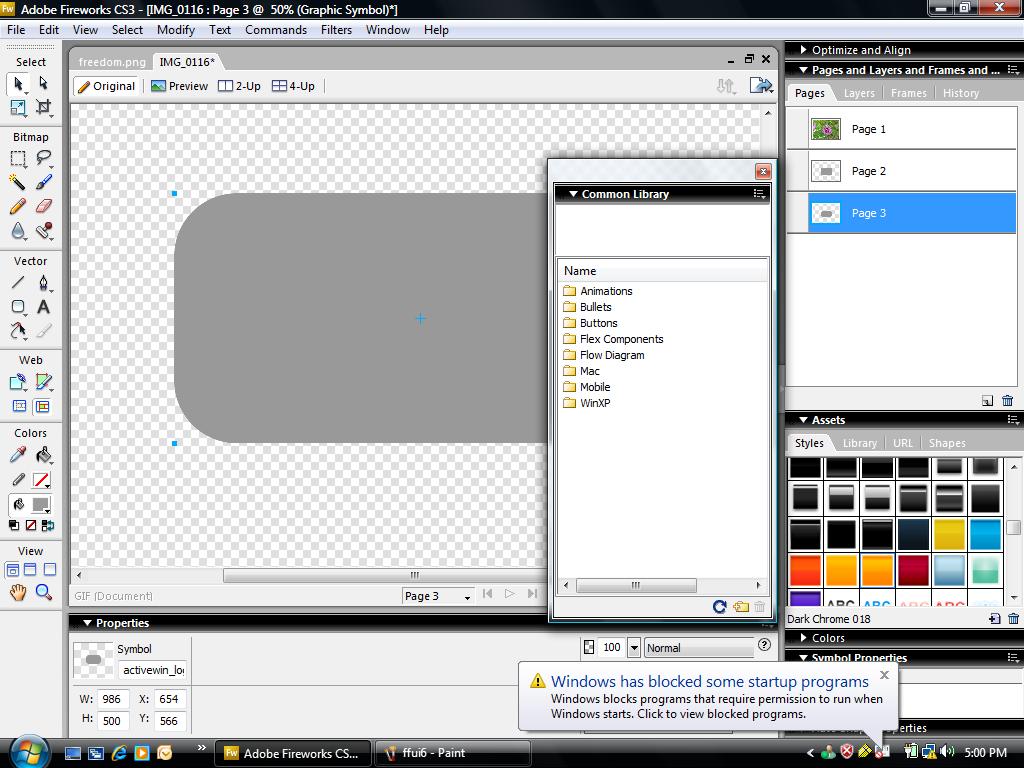
The mock ups are the prototype models for a web page to be designed. This can be very useful in order to verify whether the mock up satisfies the client’s needs and if the changes are required, then it will be implemented in the original web page design. The webpage mock ups are designed by different type of software and the Firework from the Adobe Company provides many facilities to design the mock ups with ease.
Some of the features included in the Adobe Fireworks CS3 are like pages, improvised symbols, file interoperability, slide show facility etc. The pages are similar to the webpages where elements can be added and master page can be assigned or specification of elements for a particular page can be done. Common library has a category of pre-created symbols introduced newly. Also Symbols are improvised and resizing, breaking into small vector pieces are improved. Flash slide shows are provided for perfect transitions. Photoshop files, Flex elements can be accessed in Fireworks and files can be saved in the PSD format too.
fw1 Designing a webpage using Adobe Fireworks CS3
Now let us see how to design a mockup of a web page in fireworks CS3.
  1. Open Fireworks software, create a new file.
  2. provide the necessary required resolution details and background choices.
  3. Use the tools and properties toolbars to add tools and edit properties respectively.
  4. Many options are like shapes, paint, text tool, select, eraser etc., are provided in toolbox, you can use them to the limit fo your creativity.
  5. Properties like color adjustment, size, weight, text alignment are provided in properties box.
  6. Images can be imported from external sources of any size to the design.
ffui7 Designing a webpage using Adobe Fireworks CS3
Fireworks enable users to build complex multi-page designs within a single PNG file and also without use of frames. Master pages can be designated which contains common elements that are not changed from page to page. When all the elements are added and the design is completed, then we can save the file in the PNG form. The mockups design now can be used for analyzing the requirements of the client for any issues regarding the web page.

Domain Name - How To Pick One

Picking a domain name should be easy, right? Why, I’ll just use my business name. Not so fast, Sparky. A good bit of thought should be given to selecting a domain name.

A Cautionary Note

Picking a domain name is like getting married. You are going to have to stick with it till the bitter end. People that use your site will come to know it by the domain name. Repeat visitors will often simply type in the domain name to get to the site, better known as “type in traffic”. As an example, do you search for “Amazon” when you want to buy a book or do simply type in amazon.com? If Amazon were to change its domain name to Desert, there would be a lot of confusion. The same goes with your domain. Once you pick something, stick with it.

Your Choices

Well, the obvious choice is your business name, but it may not be the best. There are four significant issues to consider.

First, is there something about your business name that makes using it as a domain an unwise choice? This situation typically arises if you have a long business name or have plural words. “Halstatt’s Rip’n Marketing Campaigns, Inc.” is going to be a horrible domain name. Clients are going to find it difficult to type in such a domain name.

Double letter problems are a second issue that is entirely unique to the Internet. What if Sams Salon wants to use its business name as a domain? The “s” at the end of first word and beginning of the second can cause confusion. Is the domain name Samssalon.com or Samsalon.com? Confusing your users is a bad way to run a site.

The third issue concerns the nature of your site and search engine optimization. If you are shooting for a particular keyword phrase, you may be better off using that keyword phrase in your domain name. Google, for instance, looks at the domain name when evaluating a site. If the words in your domain name are spaced with dashes, many believe it will help in the ranking process. This is why you see so many xxx-xxxx-xxx.com domain names on the net. If your business focuses on a very specific area, strong consideration should be given to using relevant keywords in your domain name.

Finally, your domain name should end in “.com” and I don’t want to hear any argument or see any rolling of the eyes. The simple fact is that when people think of sites, they always type in .com. Yes, there are other extensions and .us, .net, .biz, etc., may seem unique, but it kills your traffic. Pavlov and his dog experiments had it right. People have been mentally conditioned to type in .com, so don’t select any other ending. If you do, a smart competitor will register the .com version of your name to get some free traffic. If you are really lucky, a porn site will do it!

Take a breath before you select a domain name. Like a spouse, it can be either a good or bad choice.
Posted by Saleem at 1:24 AM 0 comments 
Email This
BlogThis!
Share to Twitter
Share to Facebook

Labels: I’ll just use my business name. Not so fast, Picking a domain name should be easy,right? Why, Sparky. A good bit of thought should be given to selecting a domain name.
Cyber Land Rush
It's like a "Land Rush!"


As a real estate broker for years, I had always dreamed of having the perfect properties to sell ~ and at the right prices. I spent a small fortune attempting to attract sellers, acquiring licenses, recruiting competent agents, maintaining nice offices, and then ~ to bring in the buyers ~ on advertising.


After being forced to retire from real estate by MS (Multiple Sclerosis), I finally stumbled upon the easiest properties in the world to sell that I'd ever seen: "Domains" in "Cyberspace." Actually, a respected friend, who had never been in real estate, turned me on to it. Best of all, it didn't cost me anything to set up my new business. 


Okay, after a week I invested $10.00, but I got a domain name property to sell if I ever decide to. Like a land rush, people all over the planet are scrambling to stake their claims on the cyber landscape. I get a picture of homesteaders, in covered wagons stirring up dust, rushing to stake their claims for 160 acres. Everyone it seems wants their own website and once their personal names are gone, they can come up with other great domains, properties which will only appreciate ~ just like real estate.


I guess, some of us have to have been in other businesses to appreciate how really good a business that offering website domains is. Like in any legitimate enterprise, a good business owner should do everything that is possible to see that their customers are satisfied with the product.  I can even let my buyers "Move in" for seven days Free to see if they like their new property. I could never do that in the real estate business.


No wonder that customers want to buy up some more "Cyberproperties." It's like a land rush except the homesteaders can stake their claims all over the world without leaving their computers. Click on the Hot Ride link provided in "Remarks" to find out more~without going to Russ' website. Your access code is russmiles.

Domain Pricing Details


How much does Yahoo! Domains cost?

It depends on the term you choose
1-year term: $9.95
2-year term: $19.90
3-year term: $29.85
5-year term: $49.75
After term expires: $34.95/year
How can I pay for Yahoo! Domains?

We accept the following payment methods:
        
When will I be billed?

You will be billed for the full term when you sign up for your Yahoo! Domains service.
What happens after my term expires?

After your term expires, your subscription will be renewed automatically for another year. This annual billing cycle will continue automatically as long as you maintain your account with us.
What does Yahoo! Domains include?

Domain locking
Domain forwarding
Starter web page
Complete DNS control
24-hour toll-free support

Getting Started with Yahoo! Domains


                       This brief guide will help get you started setting up and managing the features of your new web address. If you have any questions along the way, see our Yahoo! Domains Help.

About Your Domain
When you signed up for your plan, you chose a web address, or domain, for your business. Your customers will use this domain, such as learn2yoga.com, to find your business online.
If you recently signed up for Yahoo! Domains, your domain may still be pending. Pending means that your domain is not yet active across the Internet; don't worry, this is normal for all domain registrations and changes, and can take up to 72 hours. The effects of a pending domain:
Web address: If you are registering a new domain, visitors who visit your web address will get a Page Not Found error. If you are using a domain you registered elsewhere, visitors will see the page or web site that is currently active, depending on the settings you have made at your registrar.
Email: Any email messages sent to your domain name may not be delivered while your domain is pending. If you are using a domain you ordered through another provider, your email may be delivered to your registrar until your domain becomes active.
We'll notify you as soon as your domain becomes active. In the meantime, you can begin familiarizing yourself with your Yahoo! plan features!
Using a Domain You Already Own

To use your existing domain name with your Yahoo! plan, you'll need to contact the company where you originally registered your domain, such as Network Solutions, and request a name server change to redirect your existing domain name to Yahoo!
You don't need to understand name servers to make the switch. Just provide your registrar with this information about your new service (be sure to replace learn2yoga.com with your own domain name):
I would like to request a name server change for my domain learn2yoga.com. Please change my name servers to:

Primary name server: yns1.yahoo.com
Primary IP address: 98.136.43.32
Secondary name server: yns2.yahoo.com
Secondary IP address: 66.196.84.168
After you've done this, the change may take up to 72 hours (during this time, your domain will appear as pending).

Note: This process is not a registrar transfer. Your current provider will continue to renew your domain, and you'll pay any associated fees to that provider. Yahoo! will not renew your domain. Learn more.
Your Domain Control Panel
To begin exploring your new domain features, sign in to your account:
Visit your Business Control Panel. (If you haven't entered your Yahoo! ID and password, you'll be prompted to do so here. If you forget your password, click the "Forgot your password?" link and follow the prompts to retrieve it.)
Click "Domain Control Panel."
From here, you'll see a list of tasks, where you can manage all of your Yahoo! Domains services:

Starter Web Page: Create or edit a basic web page for your web address.
Forward Your Domain: Send visitors from your domain to another web site.
Set Up Email Address: Set up your domain name email address.
View/Edit Your Domain Registration: Review and update your WHOIS contact information.
Manage Advanced DNS Settings: Set up CNAME, A Records, and MX records (for advanced users only).

Starter Web Page
When you purchase a Domains, Custom Mailbox, or Business Mail plan, we automatically create a placeholder "Under Construction" web page for you at your web address. To customize this page, you can use our starter web page feature, which allows you to add your name, contact information, and details about your business, as well as change the page design. A starter web page is a great way to establish a presence at your domain until you're ready to build a more comprehensive web site. Learn more.

Note: Do you already have a web site? You can forward traffic from your new domain name to your existing site. Learn how.
Email Features
If you have a Domains plan, you'll also get one free email address! You can specify an email address at your domain, such as linda@learn2yoga.com, and retrieve these messages from your free Yahoo! Mail account (for example, youryahooID@yahoo.com).
You can also take advantage of our "catch-all" feature, which allows any email sent to misaddressed, misspelled, or nonexistent addresses at your domain to be redirected to your Yahoo! Mail account. You can activate this feature in the "Set Up Email Address" task from the Domains Control Panel. Learn more.

Other Settings
From your Domain Control Panel, you can edit both your domain registration information and your advanced DNS settings:
Domain Registration Information: At any time, you can visit this task to edit your registrant and administrator contact information. We recommend keeping this information up-to-date in the event that your domain name registrar or another third party needs to contact you regarding any technical or legal issue with your domain name. Learn more.
Advanced DNS Settings: If you're an advanced user, you can customize your domain name to work with other services. You can add A or CNAME records, or change MX records or your name servers. However, we recommend changing DNS records only if you're an advanced users, as making such changes can prevent your services from functioning properly. If you've made changes and would like to revert to the old settings, you can reset the advanced DNS settings to their default values.
Next Steps
What's next? We'll email you as soon as your domain becomes active. To test this domain, visit your web address at http://www.yourdomain.com (be sure to replace "yourdomain.com" with your own domain name). You should see an "Under Construction" page, or, if you set up a starter web page, your business and contact information in the template you selected. (If you forwarded your domain, you 

YAHOO HAS STARTED ROBBERY ON DOMAIN RENEWAL OR QUITTING FROM DOMAIN REGISTRATION & HOSTING SERVICES


Everything was going fine until yesterday when I received an email from yahoo small business for the renewal of my domain name. I was shocked to find that yahoo has increased the domain renewal price from $9.95 per year to $34.95 per year, nearly 400% increase.
Does this mean… yahoo has planned to quit its domain registration and hosting business in its Yahoo small business arm by increasing the renewal rates by 400%. Any how this is going to burn the pockets of few hundred thousand users who have registered their domain and hostingservices with yahoo. This may go unnoticed until you get your credit card statement as more than 90% people have opted for auto renewal.
I now have enough time to transfer my domain and hosting to a more reliable provider, whom I can trust, with whose support I can instantly call & get reply or get instant replies to the email. I researched through google & found a reliable domain registration provider Silicasys Technology who is in domain registration & hosting business for the past 9 years & providing reliable service.
New domain registration or domain transfer is just $9 per year, no hidden charges and renewals is also at the same price. Have your own domain controlpanel do any editing on the whois by yourself.
Web Hosting